
Free · No account · iPhone and iPad
Your coding agent runs on your computer. You run it from your phone.
Hand a task to the agent on your own machine, watch every step as it happens, answer when it asks, approve its plan, and pick up the files it produces. Nothing runs on our servers, and there is no account to create.
- No sign-up, no profile
- Pinned to your own certificate
- Your code never leaves your machine
Miễn phí · Không cần tài khoản · iPhone và iPad
Agent lập trình chạy trên máy tính của bạn. Bạn điều khiển nó từ điện thoại.
Giao việc cho agent trên máy tính của bạn dù đang ở đâu, xem từng bước ngay khi nó diễn ra, trả lời khi Agent hỏi, duyệt kế hoạch, rồi nhận về những tệp Agent tạo ra. Không có gì chạy trên máy chủ của chúng tôi, và không cần tạo tài khoản.
- Không đăng ký, không hồ sơ
- Ghim theo chứng chỉ của chính bạn
- Mã nguồn không rời khỏi máy bạn
How it works
Three steps, about a minute
Agent Commander is two halves: a server you install next to the coding agent you already use, and an app that drives it. They meet once, through a QR code, and never need anybody else after that.
-
Install the server
One command on the computer where your coding agent is already set up. No administrator rights, and nothing written outside your own user folder.
-
Scan the pairing code
Setup ends with a QR code. The app reads your server address and records its TLS certificate at that moment — anything that does not match it later is refused.
-
Send a task from anywhere
Type a request, attach a photo or a file, and watch the turn stream in. Close the app: a notification brings you back when it finishes or needs a decision.
Cách hoạt động
Ba bước, khoảng một phút
Agent Commander gồm hai nửa: một máy chủ bạn tự cài ngay cạnh agent lập trình vẫn dùng, và một app điều khiển nó. Hai bên nhận nhau đúng một lần qua mã QR, sau đó không cần ai khác nữa.
-
Cài máy chủ
Một dòng lệnh trên chính máy tính đã có sẵn agent lập trình. Không cần quyền quản trị, và không ghi gì ra ngoài thư mục người dùng của bạn.
-
Quét mã ghép nối
Bước cài kết thúc bằng một mã QR. App đọc địa chỉ máy chủ và ghi lại chứng chỉ TLS ngay lúc đó — về sau thứ gì không khớp đều bị từ chối.
-
Giao việc từ bất cứ đâu
Gõ yêu cầu, đính kèm ảnh hay tệp, rồi xem lượt đổ về. Đóng app cũng được: thông báo sẽ gọi bạn quay lại khi xong hoặc khi cần bạn quyết.
Features
Everything a turn needs, on the screen you already carry
Built around one idea: leaving the desk should not mean leaving the agent unattended.
-
Live transcript
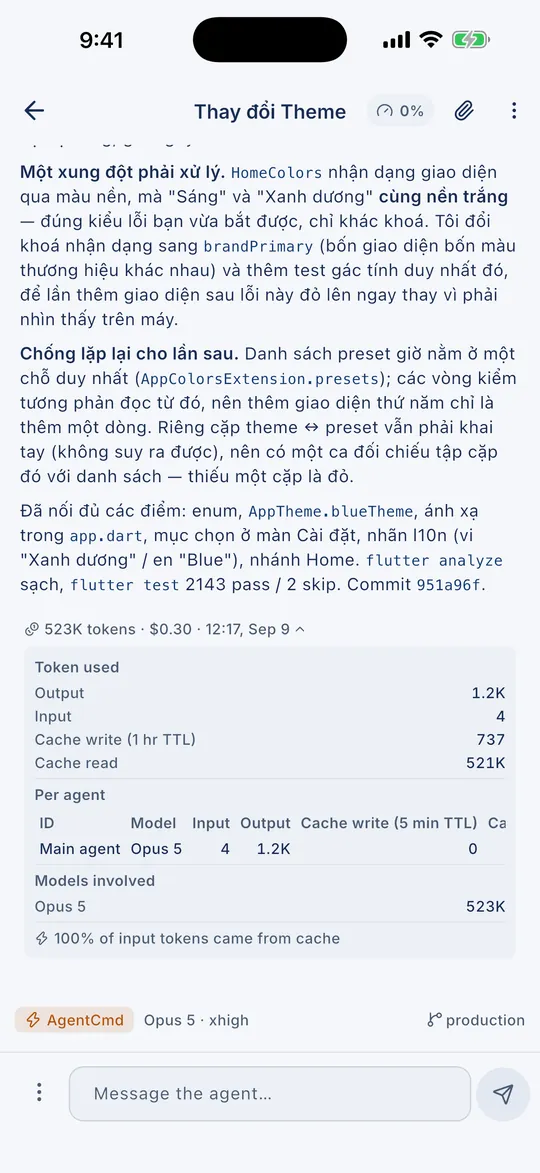
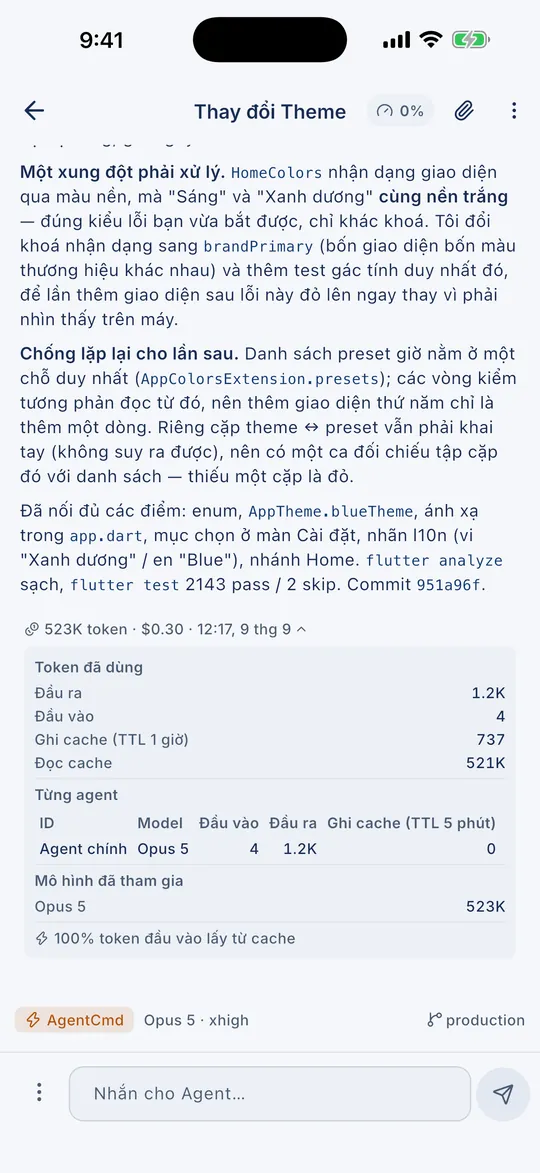
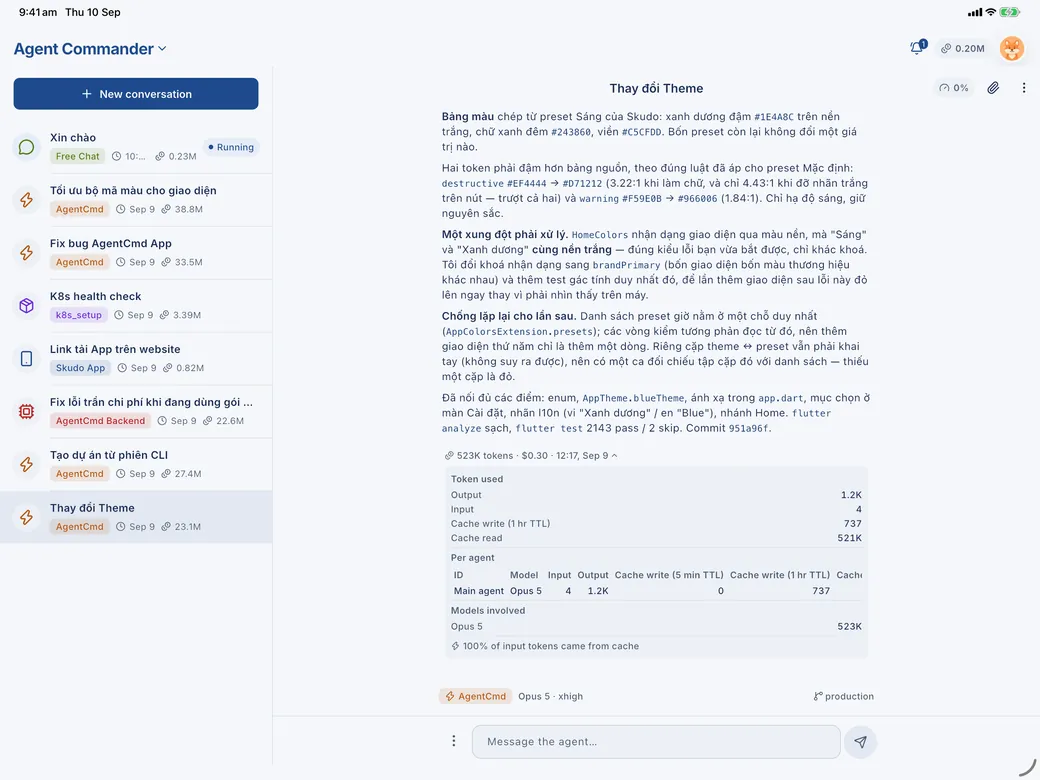
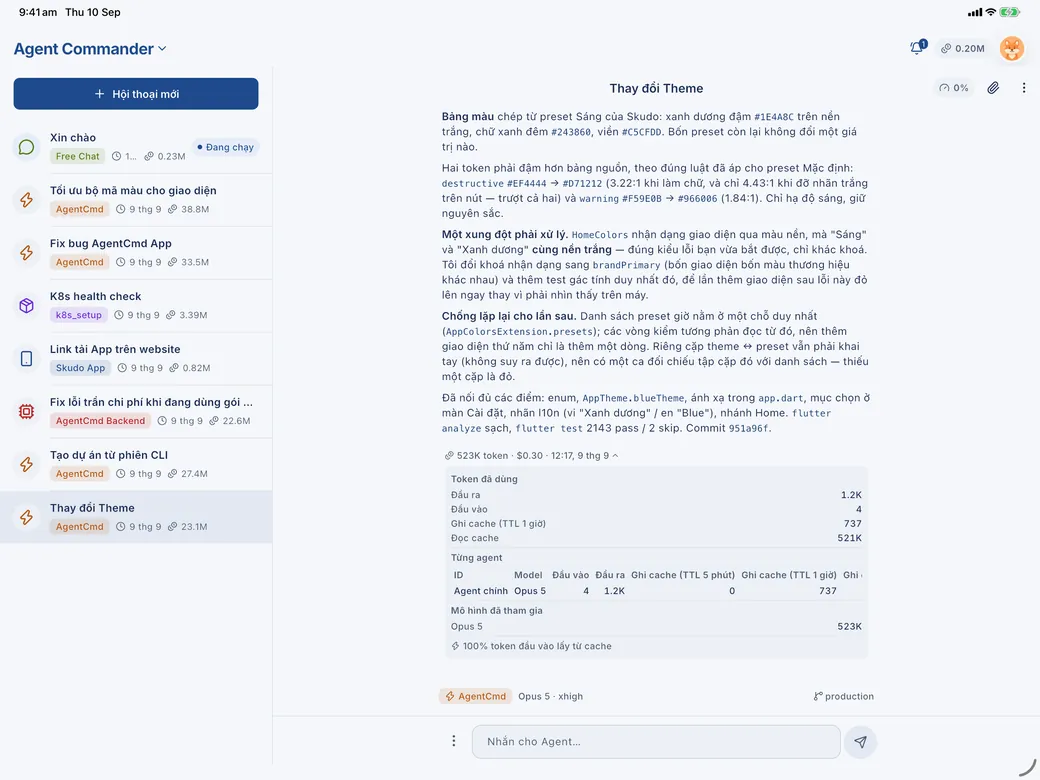
Every tool call, every file read or edited, every diff — streamed to your phone while the turn is still running. Type @ to point at a file, / to run a skill.
-
Decide without sitting there
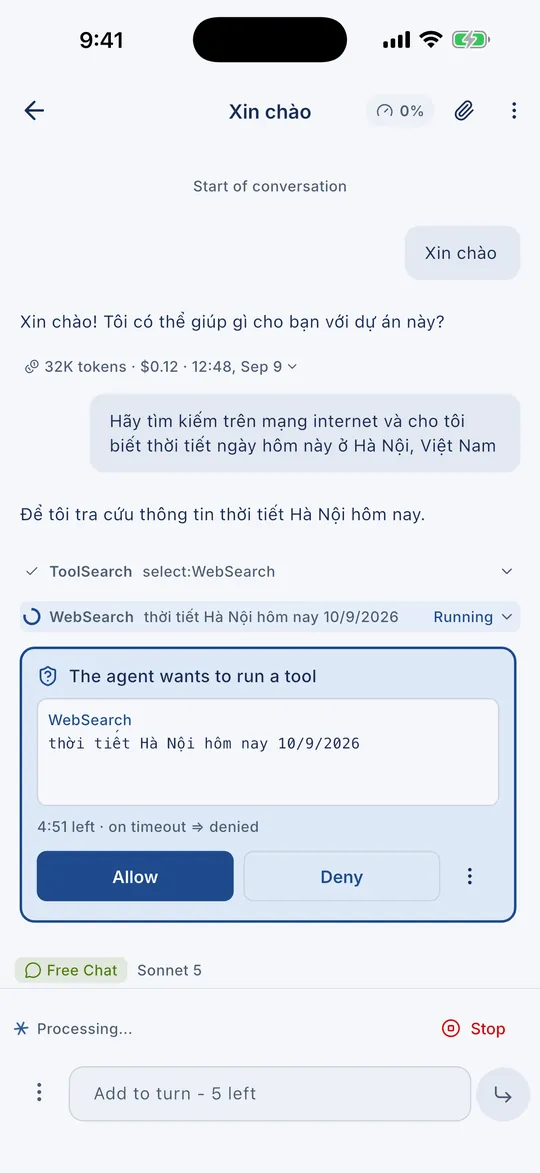
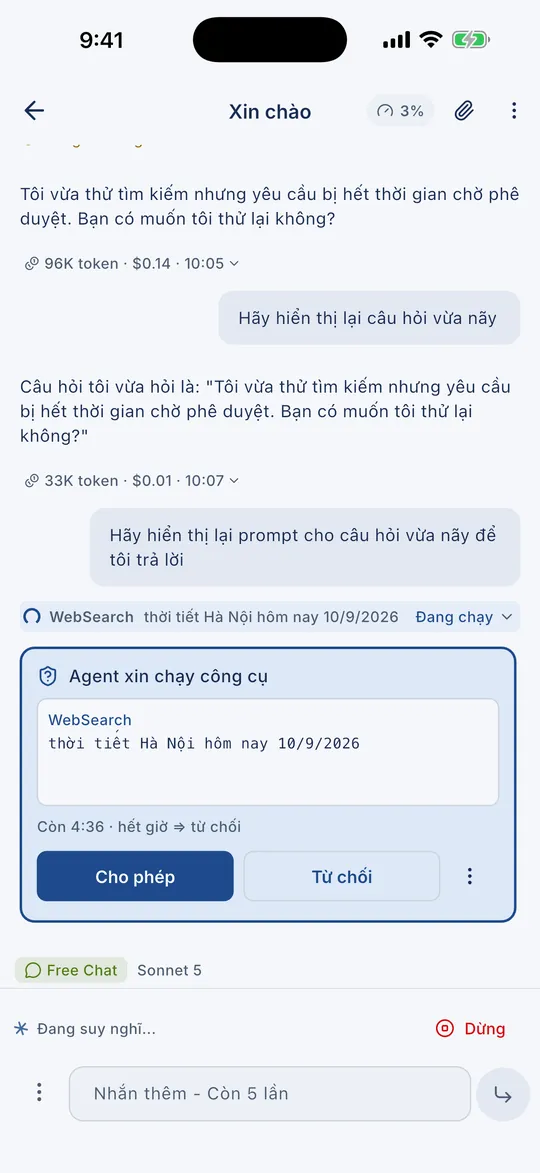
Allow a tool, answer a question, approve a plan: each one arrives as a card with a countdown, and a notification brings you back for it. Steer a running turn with one more message, or queue up the next.
-
One app, three agents
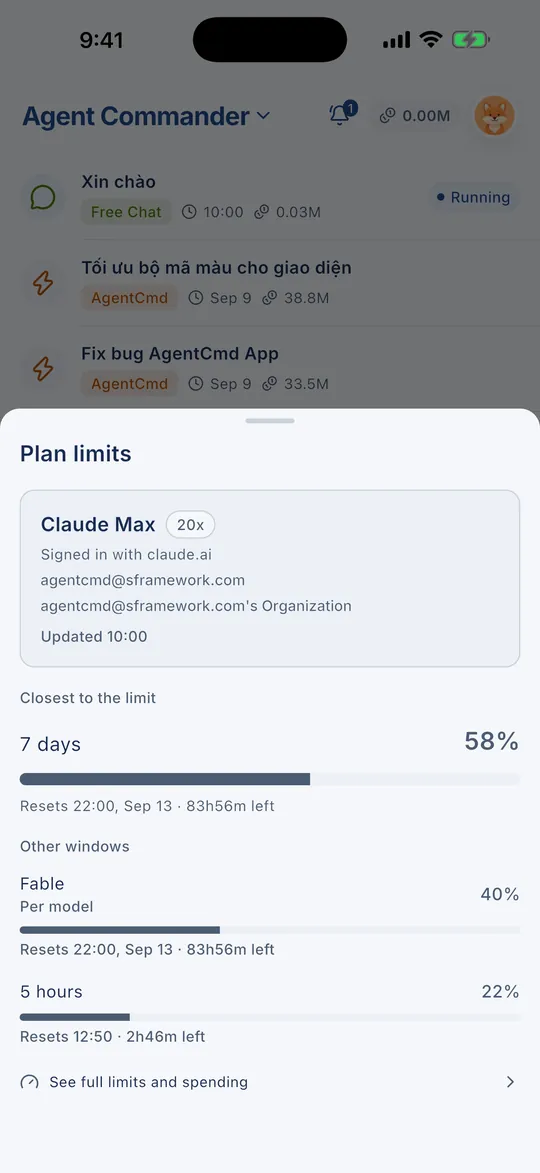
Works with the Claude Code CLI, the Codex CLI and Antigravity. Choose the agent for each conversation, then its model and effort from what your server offers. Switch models mid-conversation and check each provider's plan limits.
-
Agents that delegate
The main agent hands sub-tasks to another agent or model — by rules you set per project, or by your pick for a single turn. Follow each sub-task live, open its conversation, answer its questions and read its report.
-
Pick up terminal sessions
Sessions you started with the CLI on your computer show up in the app, live while they run. Continue any of them as a new conversation, on the model it last used.
-
Control, project by project
Ask first, accept edits, plan first or full access — set per project, changed mid-conversation. Each project also keeps its own system prompt, allow and deny rules, MCP servers, agents and skills.
-
Collect the output
Files the agent produces land in one place. Preview images, SVG, HTML, Markdown, JSON and text right in the app, then save or share them.
-
Browse and edit the project
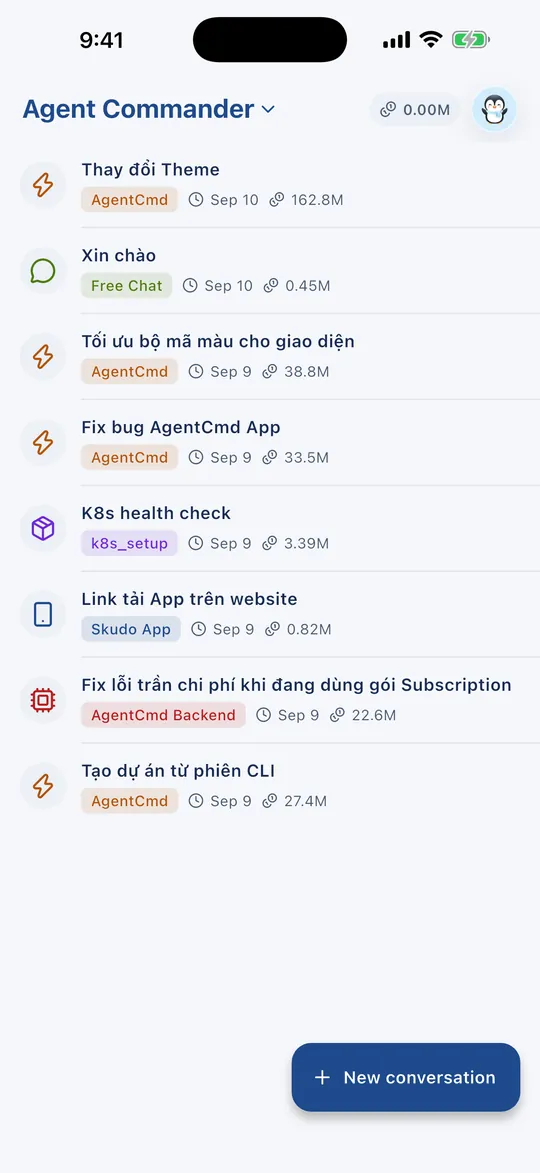
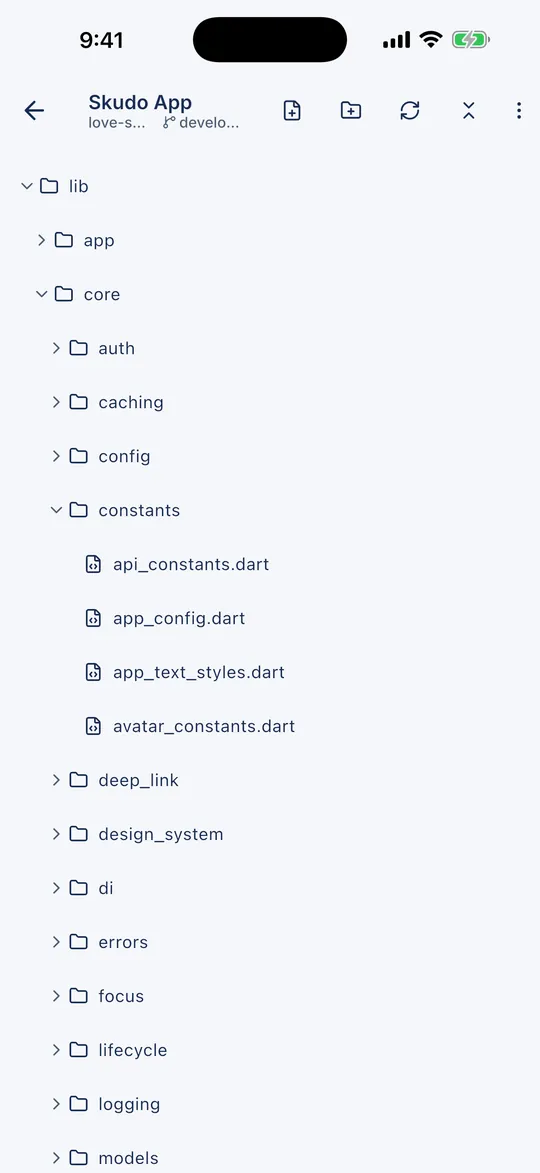
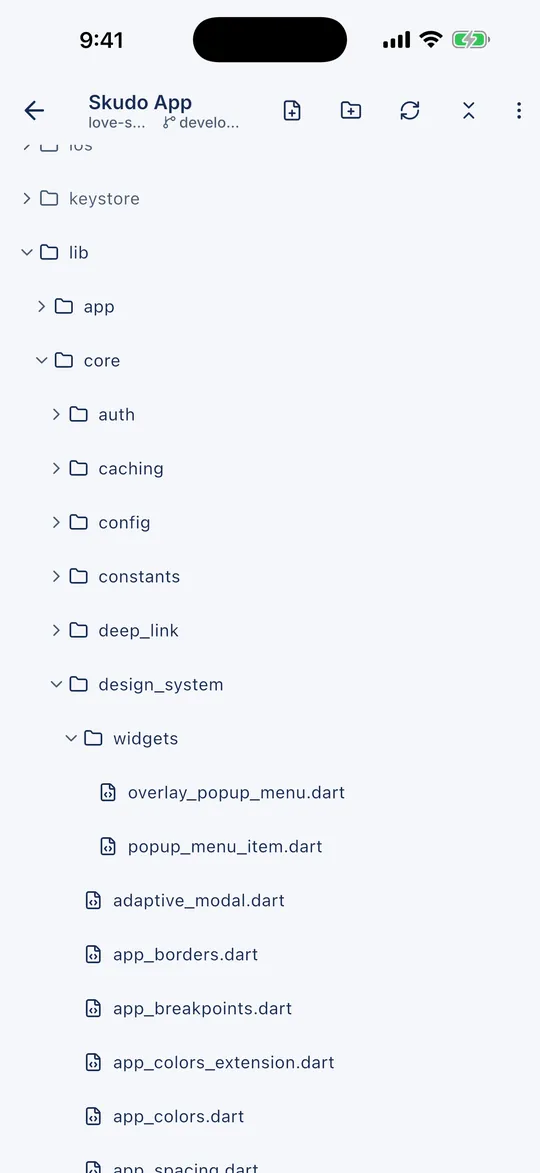
Open the file tree, read code with syntax highlighting, edit and save, create, rename, move or delete. Git badges show what changed, and every file's history is one tap away.
-
Review the work
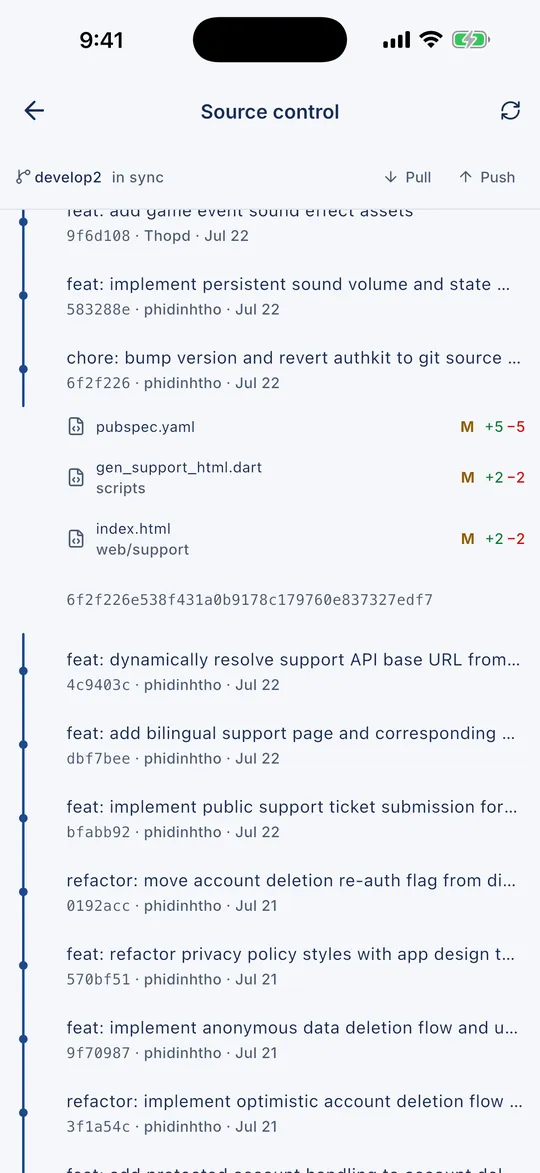
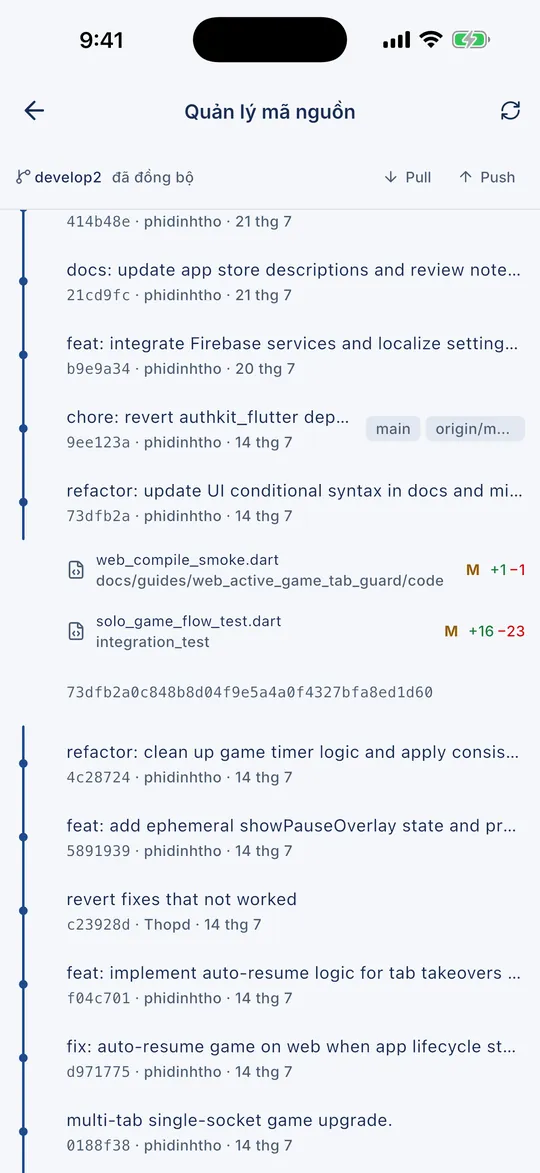
Commit history as a branch graph, the diff of every commit and every file, pull, push and publish a branch — all from the phone.
-
Keep a task list
Note what needs doing in each project, attach files, add comments, and link a task to the conversation that handles it. Tasks live on your server, so they survive a reinstall.
-
Know what it costs
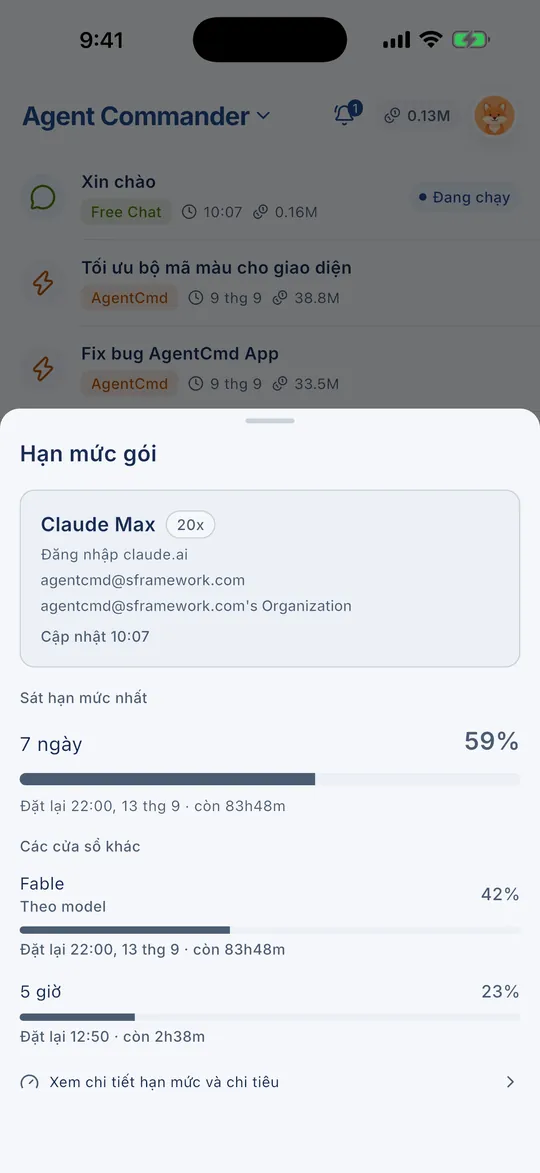
Tokens and estimated cost for every turn, today's total, a per-project summary, and how much of your plan limits is left. A timer shows while the prompt cache is still warm.
-
Rewind and fork
Restore files to how they were before a turn, or fork a conversation to try another approach without losing the first one. A context meter shows how full the window is — compact it whenever you like.
Tính năng
Đủ thứ một lượt cần, trên màn hình bạn luôn mang theo
Dựng quanh đúng một ý: rời bàn làm việc không có nghĩa là bỏ mặc Agent.
-
Transcript trực tiếp
Từng công cụ được gọi, từng tệp được đọc hay sửa, từng diff — đổ về điện thoại ngay khi lượt còn đang chạy. Gõ @ để chỉ tới một tệp, / để chạy một skill.
-
Quyết mà không phải ngồi canh
Cho phép chạy công cụ, trả lời câu hỏi, duyệt kế hoạch: mỗi việc là một thẻ kèm đồng hồ đếm ngược, và thông báo gọi bạn quay lại đúng lúc. Lượt đang chạy vẫn nhắn thêm được, hoặc xếp sẵn lượt kế tiếp.
-
Một app, ba agent
Chạy cùng Claude Code CLI, Codex CLI và Antigravity. Chọn agent cho từng hội thoại, rồi chọn model và mức nỗ lực trong danh mục máy chủ đưa ra. Đổi model giữa chừng hội thoại, và xem hạn mức gói của từng provider.
-
Agent biết giao việc
Agent chính giao tác vụ con cho agent hay model khác — theo luật giao việc bạn đặt cho từng dự án, hoặc theo lựa chọn của bạn cho một lượt. Theo dõi từng tác vụ con trực tiếp, mở hội thoại của nó, trả lời câu nó hỏi và đọc báo cáo.
-
Nối tiếp phiên CLI
Các phiên CLI bạn chạy trên máy tính hiện ngay trong app, cập nhật trực tiếp khi đang chạy. Tiếp tục bất kỳ phiên nào thành một hội thoại mới, trên đúng model phiên đó dùng cuối.
-
Kiểm soát theo từng dự án
Hỏi trước, tự nhận sửa tệp, chỉ lập kế hoạch hay bỏ qua hỏi quyền — đặt theo dự án, đổi giữa chừng hội thoại. Mỗi dự án còn giữ chỉ dẫn hệ thống, luật cho phép và từ chối, MCP server, tác vụ con và skill của riêng nó.
-
Gom kết quả
Tệp Agent tạo ra nằm một chỗ. Xem trước ảnh, SVG, HTML, Markdown, JSON và văn bản ngay trong app, rồi lưu hoặc chia sẻ.
-
Duyệt và sửa dự án
Mở cây thư mục, đọc mã có tô màu cú pháp, sửa rồi lưu, tạo, đổi tên, di chuyển hay xoá. Huy hiệu git cho biết tệp nào đã đổi, và lịch sử của từng tệp chỉ cách một chạm.
-
Soát lại công việc
Đồ thị nhánh của lịch sử commit, diff của từng commit và từng tệp, pull, push và publish nhánh — tất cả từ điện thoại.
-
Giữ danh sách việc
Ghi việc cần làm cho từng dự án, đính kèm tệp, bình luận, và gắn việc với hội thoại xử lý nó. Việc nằm trên máy chủ của bạn nên cài lại app vẫn còn.
-
Biết tốn bao nhiêu
Token và chi phí ước tính của từng lượt, tổng hôm nay, bảng tổng kết theo dự án, và hạn mức gói còn lại bao nhiêu. Đồng hồ cho biết prompt cache còn ấm bao lâu.
-
Khôi phục tệp và rẽ nhánh
Đưa tệp về trạng thái trước một lượt, hoặc rẽ nhánh hội thoại để thử hướng khác mà không mất hướng cũ. Đồng hồ ngữ cảnh cho biết cửa sổ đã đầy bao nhiêu — nén ngữ cảnh bất cứ lúc nào bạn muốn.
Screens
What it actually looks like
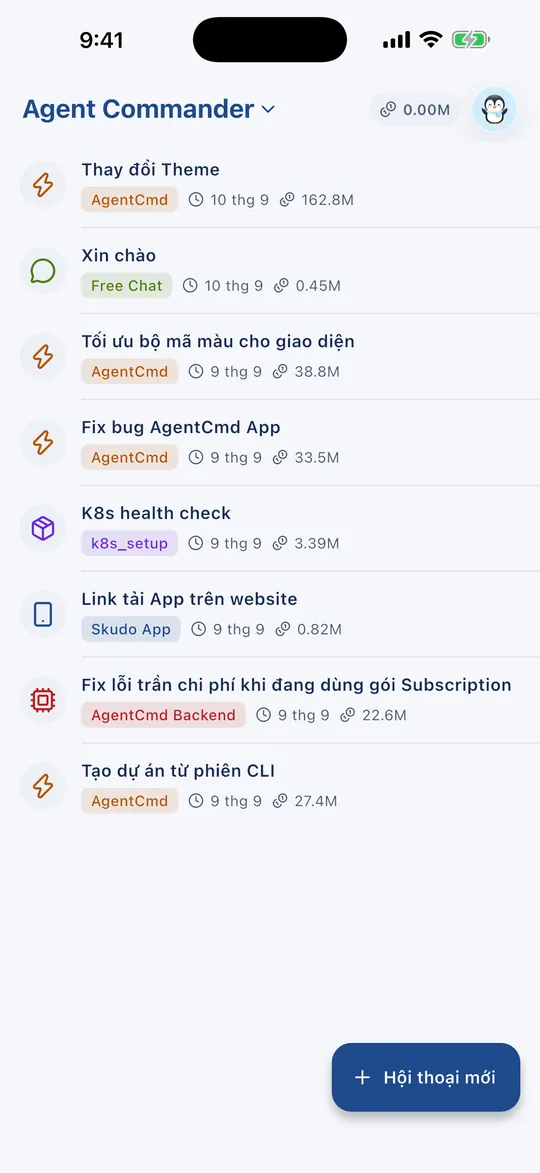
Screenshots from the app itself — English and Vietnamese, iPhone and iPad.
Màn hình
Nhìn thật thì thế nào
Ảnh chụp từ chính app — tiếng Việt và tiếng Anh, iPhone và iPad.
The server
One binary, one file, on your machine
The other half of this product is not a cloud service. It is a Go binary and a SQLite file that live on the computer you already code on: they hold your conversations, drive the coding agent, and speak HTTPS and WebSocket to your phone over a certificate you own.
# macOS · Linux · WSL — no sudo, nothing outside your home directory
$ curl -fsSL https://github.com/phidinhtho/agentcmd-release/releases/latest/download/install.sh | bash

# need the pairing QR code again?
$ agentcmd auth show
# Windows 11 — PowerShell, no administrator rights, nothing outside your user folder
PS> irm https://github.com/phidinhtho/agentcmd-release/releases/latest/download/install.ps1 | iex
# need the pairing QR code again?
PS> agentcmd auth showThe installer detects your platform, verifies the release checksum, puts agentcmd where your account can run it, and hands over to setup.
What setup does for you
- Creates the data directory and a migrated SQLite database
- Generates the TLS key and certificate that the app will pin
- Writes an environment file readable only by you
- Installs and starts a background service (launchd, systemd or Task Scheduler)
- Prints a pairing QR code, valid for ten minutes
- One binaryGo, no CGO. No database server, no Node and no Redis to run beside it.
- Where it runsmacOS on Apple Silicon and Intel, Linux on amd64 and arm64, Windows 11 on x64, and WSL.
- Works with your agentThe Claude Code CLI, the Codex CLI or Antigravity — whichever you already use, installed and signed in on the same computer.
- Stays healthydoctor checks the setup, status reports it, and update replaces the binary and restarts the service in place.
- Several phones, one serverPair more than one device, see them all, and revoke any of them.
- A desktop companionA menu bar app on macOS, a system tray app on Windows: start, stop and watch the server without opening a terminal.
Máy chủ
Một binary, một file, trên máy của bạn
Nửa còn lại của sản phẩm không phải dịch vụ đám mây. Đó là một binary Go và một file SQLite sống trên chính máy bạn vẫn code: chúng giữ hội thoại, điều khiển agent lập trình, và nói HTTPS cùng WebSocket với điện thoại qua một chứng chỉ của riêng bạn.
# macOS · Linux · WSL — không cần sudo, không ghi ra ngoài thư mục nhà
$ curl -fsSL https://github.com/phidinhtho/agentcmd-release/releases/latest/download/install.sh | bash

# cần lại mã QR ghép nối?
$ agentcmd auth show
# Windows 11 — PowerShell, không cần quyền quản trị, không ghi ra ngoài thư mục người dùng
PS> irm https://github.com/phidinhtho/agentcmd-release/releases/latest/download/install.ps1 | iex
# cần lại mã QR ghép nối?
PS> agentcmd auth showTrình cài dò đúng nền tảng, kiểm sha256 của bản phát hành, đặt agentcmd vào chỗ tài khoản của bạn chạy được rồi chuyển tiếp sang bước setup.
Bước setup lo sẵn những gì
- Tạo thư mục dữ liệu và cơ sở dữ liệu SQLite đã migrate
- Sinh khoá và chứng chỉ TLS mà app sẽ ghim
- Ghi env file chỉ mình bạn đọc được
- Cài và bật dịch vụ chạy nền (launchd, systemd hoặc Task Scheduler)
- In ra mã QR ghép nối, hiệu lực mười phút
- Một binaryGo, không CGO. Không cần máy chủ cơ sở dữ liệu, không Node, không Redis chạy kèm.
- Chạy ở đâumacOS trên Apple Silicon và Intel, Linux amd64 và arm64, Windows 11 x64, và WSL.
- Chạy cùng agent bạn đang dùngClaude Code CLI, Codex CLI hoặc Antigravity — cái nào bạn đang dùng, đã cài và đăng nhập trên cùng máy tính.
- Tự giữ sức khoẻdoctor soát lại cài đặt, status báo tình trạng, update thay binary rồi bật lại dịch vụ ngay tại chỗ.
- Nhiều máy, một máy chủGhép nối nhiều thiết bị, xem tất cả, thu hồi bất kỳ chiếc nào.
- App đi kèm trên máy tínhApp menu bar trên macOS, app khay hệ thống trên Windows: bật, tắt và theo dõi máy chủ mà không phải mở terminal.
Privacy
There is nothing here for us to hand over
This is not a promise about how carefully we handle your data. It is an architecture in which we never receive it.
- No account, everNo sign-up, no profile, no third-party login. Pairing with your server is the only identity there is.
- Your work stays where you put itConversations, code and files live on the computer running the server. We hold no copy and have no access.
- Pinned connectionsThe app records your server certificate the moment you pair, and refuses to talk to anything that does not match it afterwards.
- The relay carries no contentThe only service we operate is a stateless notification relay. It wakes your phone; it never sees a conversation.
- No ads, no trackingNo in-app purchases, no advertising and no usage analytics. Anonymous crash reports only.
- Unpairing wipes the deviceUnpair and the app deletes its local data on the spot, including the files it had downloaded.
Riêng tư
Ở đây không có gì để chúng tôi giao nộp
Đây không phải lời hứa sẽ giữ gìn dữ liệu của bạn cẩn thận. Đây là một kiến trúc mà chúng tôi không bao giờ nhận được nó.
- Không tài khoản, không bao giờKhông đăng ký, không hồ sơ, không đăng nhập bên thứ ba. Ghép nối với máy chủ của bạn là danh tính duy nhất.
- Việc của bạn ở nguyên chỗ bạn đặtHội thoại, mã nguồn và tệp nằm trên máy đang chạy máy chủ. Chúng tôi không có bản sao và không truy cập được.
- Kết nối ghim chứng chỉApp ghi lại chứng chỉ máy chủ ngay lúc ghép nối, và từ chối nói chuyện với bất cứ thứ gì không khớp sau đó.
- Relay không mang nội dungDịch vụ duy nhất chúng tôi vận hành là một relay thông báo không giữ trạng thái. Nó đánh thức điện thoại; nó không bao giờ thấy hội thoại.
- Không quảng cáo, không theo dõiKhông mua trong ứng dụng, không quảng cáo, không phân tích hành vi. Chỉ có báo cáo sự cố ẩn danh.
- Ngắt ghép nối là xoá sạch trên máyNgắt ghép nối và app xoá dữ liệu cục bộ ngay lập tức, kể cả những tệp đã tải về.
Chính sách quyền riêng tư · Điều khoản sử dụng · Xoá dữ liệu của bạn
FAQ
The questions people actually ask
If yours is not here, the support page goes deeper.
Do I need an account?
No. There is no sign-up and no profile. The app pairs once with a server you run yourself, and that pairing is the only identity involved.
Which coding agents does it work with?
The Claude Code CLI, the Codex CLI and Antigravity — the copies already installed and signed in on your computer. Pick one for each conversation, and let the main agent hand sub-tasks to another.
Where does my code live?
On the machine running the server, inside its data directory. Nothing is stored on a publisher-operated server, so there is nothing for us to lose or disclose.
Can I reach my computer from another network?
Yes, through Tailscale or a public address. The pairing code carries every address your server has, local network included, and when one stops answering the app moves to another on its own — no new scan.
Can I pick up work I started in the terminal?
Yes. Sessions you ran with the CLI on that computer appear in the app, live while they run, and any of them can continue as a new conversation in the app.
What does it cost?
The app is free: no in-app purchases, no subscription and no ads. Whatever your coding agent costs to run is billed by your existing plan with its provider, not by us.
Which platforms are supported?
The app runs on iPhone and iPad, iOS 15 or later. The server runs on macOS (Apple Silicon and Intel), Linux (amd64 and arm64), Windows 11 (x64) and WSL.
What if a turn takes twenty minutes?
Close the app. The server keeps the turn running, and a notification brings you back when it finishes or when it needs a decision.
Hỏi đáp
Những câu người dùng hỏi thật
Không thấy câu của bạn ở đây thì trang hỗ trợ nói sâu hơn.
Có phải tạo tài khoản không?
Không. Không đăng ký, không hồ sơ. App ghép nối đúng một lần với máy chủ bạn tự chạy, và cái ghép nối đó là danh tính duy nhất.
App chạy cùng những agent lập trình nào?
Claude Code CLI, Codex CLI và Antigravity — bản đã cài và đăng nhập trên máy bạn. Chọn một agent cho từng hội thoại, và để agent chính giao tác vụ con cho agent khác.
Mã nguồn của tôi nằm ở đâu?
Trên máy đang chạy máy chủ, trong thư mục dữ liệu của nó. Không có gì lưu trên máy chủ của nhà phát hành, nên cũng không có gì để chúng tôi làm mất hay tiết lộ.
Ở mạng khác có vào được máy tính của tôi không?
Được, qua Tailscale hoặc địa chỉ công khai. Mã ghép nối mang mọi địa chỉ của máy chủ, kể cả địa chỉ mạng LAN, và khi một địa chỉ ngừng trả lời thì app tự chuyển sang địa chỉ khác — không phải quét lại.
Việc đang làm dở ở terminal có tiếp tục được không?
Được. Các phiên CLI bạn chạy trên máy đó hiện trong app, cập nhật trực tiếp khi đang chạy, và phiên nào cũng tiếp tục được thành một hội thoại mới trong app.
Chi phí thế nào?
App miễn phí: không mua trong ứng dụng, không thuê bao, không quảng cáo. Còn tiền chạy agent lập trình thì tính vào gói bạn đang có với nhà cung cấp của nó, không phải với chúng tôi.
Hỗ trợ những nền tảng nào?
App chạy trên iPhone và iPad, iOS 15 trở lên. Máy chủ chạy trên macOS (Apple Silicon và Intel), Linux (amd64 và arm64), Windows 11 (x64) và WSL.
Lượt chạy hai mươi phút thì sao?
Cứ đóng app. Máy chủ vẫn chạy tiếp lượt đó, và thông báo sẽ gọi bạn quay lại khi xong hoặc khi cần bạn quyết.
Install the server, scan the code, send the first task.
About a minute on the computer you already code on. After that, the phone in your pocket is enough.
Agent Commander is an independent, third-party client. It is not affiliated with, endorsed by, or sponsored by Anthropic. Claude and Claude Code are trademarks of Anthropic.
Cài máy chủ, quét mã, giao việc đầu tiên.
Khoảng một phút trên chính máy bạn vẫn code. Sau đó chiếc điện thoại trong túi là đủ.
Agent Commander là ứng dụng khách độc lập của bên thứ ba, không liên kết, không được chứng thực hay tài trợ bởi Anthropic. Claude và Claude Code là nhãn hiệu của Anthropic.